

IFS Permissions Manager
Are you a user of IFS Applications 10 or IFS Cloud or are you in the process of implementing this modern solution? If so then the IFS Permissions Manager is the right tool for you. The online tool supports you when creating, managing, and auditing your roles and permissions. The web-based tool is directly connected to your IFS environment. The tool visualizes the roles and permissions and greatly reduces the effort needed to set-up and manage your IFS security settings. In addition, you can profit from best practice templates and segregation of duties checks built into the tool. Your internal and external auditors will greatly value these features.
If you have been using IFS for some time then the IFS Permissions Manager can visualize and compare your set-up with our best practice. In addition to the tool we also offer consulting services, training, and best practice templates.
Everything you need to manage IFS roles and permissions
Pick a function to see it in action.

Permission Set Categories: A Seamless Experience
Categories is a feature that lets you group and clasify your Permission Sets. This greatly eases the finding and managing of your permission sets. For example you could categorize and save all your finance permission sets. The categories are available throughout the tool and greatly increase efficiency and preciseness.
- Effortless Management:
Take charge of your Permission Set Categories without leaving the tool. No more IFS detours. - Unleash Creativity:
Craft, delete, and copy Permission Set Categories with ease. Your system, your rules! - No More Mistakes:
Bid farewell to duplicates. Our tool has built-in duplicate prevention to keep things clean and clear. - Friendly Warnings:
We're making sure you do not make mistakes. Receive a heads-up when trying to delete Permission Set Categories with assigned Permission Sets. - Real-Time Harmony:
Enjoy bi-directional synchronization in real time with IFS (Applications or Cloud). Keep your categories perfectly in sync without any hassle.
Experience the freedom of managing your Permission Set Categories effortlessly and efficiently with our IFS tool!

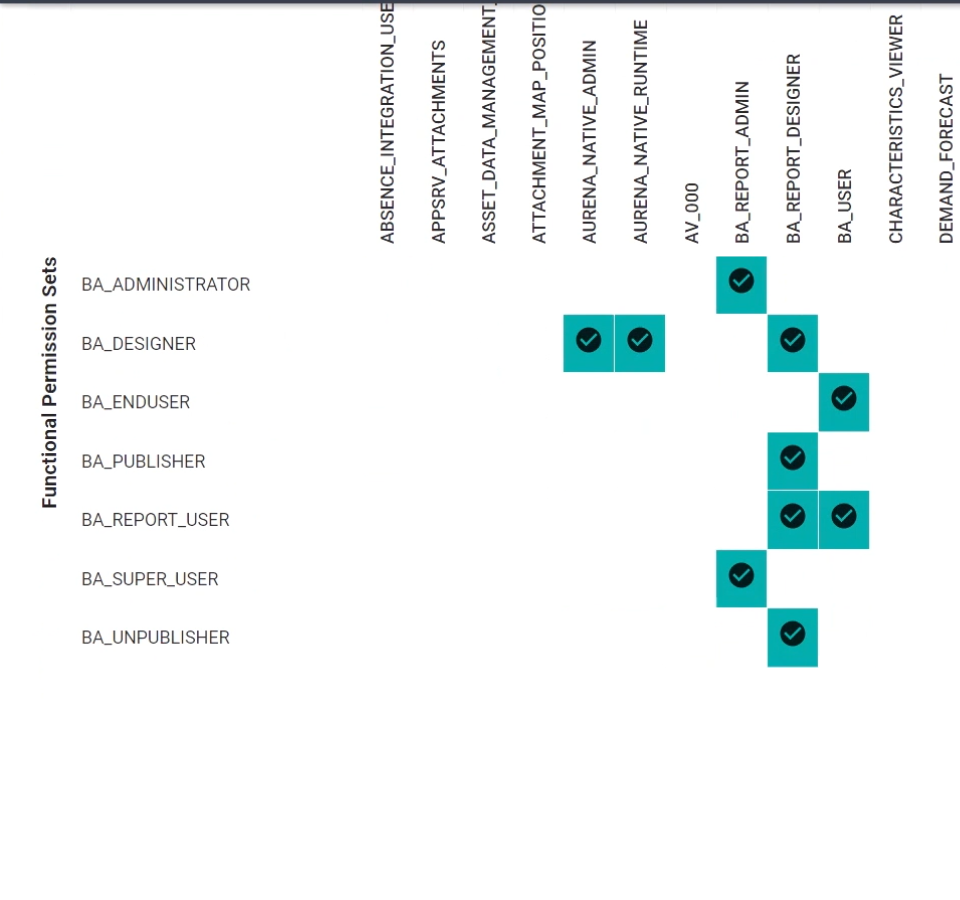
Functional Permission Sets: Your Key to Control
Functional Permission Sets are groups of permissions that belong together. Grouping individual permissions makes them easier to handle, manage and assign.
- Masterful Management:
Take control of all your Functional Permission Sets effortlessly. No more struggle, and it's synced in real time with IFS for a seamless experience. - Create with Ease:
Craft new Functional Permission Sets by clicking. Assign them to the perfect Permission Set Category. It's your power, made simple.
Reclaim your authority over Functional Permission Sets and streamline your operations with our IFS tool!

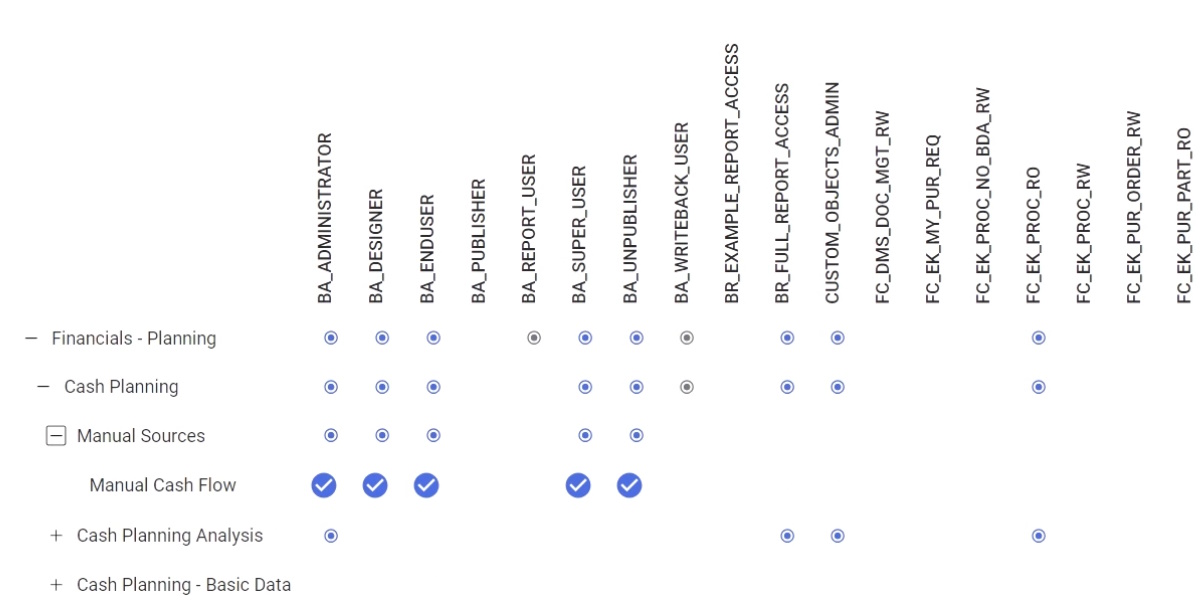
Navigator to Functional Permission Sets Matrix: Simplify Access Control
The Navigator to Functional Permission Set view shows the expandable/collapsible navigator and the grants associated with all or selected Functional Permission Sets (FPS). Changes to the grant type (read, read/write, none) can be made with a click. The nesting of grants within collapsed entities is visible on the top line.
- Access Control Made Easy:
Take charge of your Navigator entry access levels effortlessly in the IFS tool's matrix view. It's a control center at your fingertips. - Streamlined Permissions:
Easily identify and consolidate granted permissions to the highest level. No more complexity, just clarity. - One-Click Access:
Say goodbye to the hassle of complex granting and degranting. With a simple click, you can manage it all in the matrix view. It's that straightforward.
Empower your team with effortless access control through our Navigator to Functional Permission Sets Matrix in the IFS tool!

End User Roles: Your Gateway to Efficiency
In todays fast-paced and changing world one best practice is to set-up End user Roles and not to connect rights to individual users. These roles build the hingepin between End users and permissions. This enables far better control and ease of onboarding, enhancing and offboarding End users.
- Effortless Role Management:
Seamlessly manage End user roles, including assigned categories, and effortlessly keep track of creation and modification dates. It's your control center. - No More Duplicate Hassles:
Bid farewell to naming duplicates. Our tool will alert you when trying to create end user roles with the same name or delete those that are assigned. - Visual Comparison of Roles:
Compare rales in a table seeing which Functional Permissions Sets are granted and which End Users have been given what type of roles.
Empower your organization with streamlined end user role management and ensure efficiency with our IFS tool!

Functional Permission Sets to End User Roles Matrix: Your Shortcut to Control
This powerful combination provides a visual dashboard of the End user Roles and the associated Functional Permission Sets, all which can be grouped and filtered according to the categories. If necessary you can deep dive into the roles or FPS with the embedded linking technology.
- Streamlined Access Control:
Just like "Navigator to Functional Permission Sets" view, you can effortlessly manage access levels for specific Functional Permission Sets. It's your matrix view in the IFS tool for end-user roles. - Effortless Permissions:
Easily navigate between Functional Permission Sets and the "Navigator to Functional Permission Sets" matrix with a simple click. It's the quickest way to filter the permissions you need.
Simplify your access control and enjoy a seamless experience with our Functional Permission Sets to End-User Roles Matrix in the IFS tool!

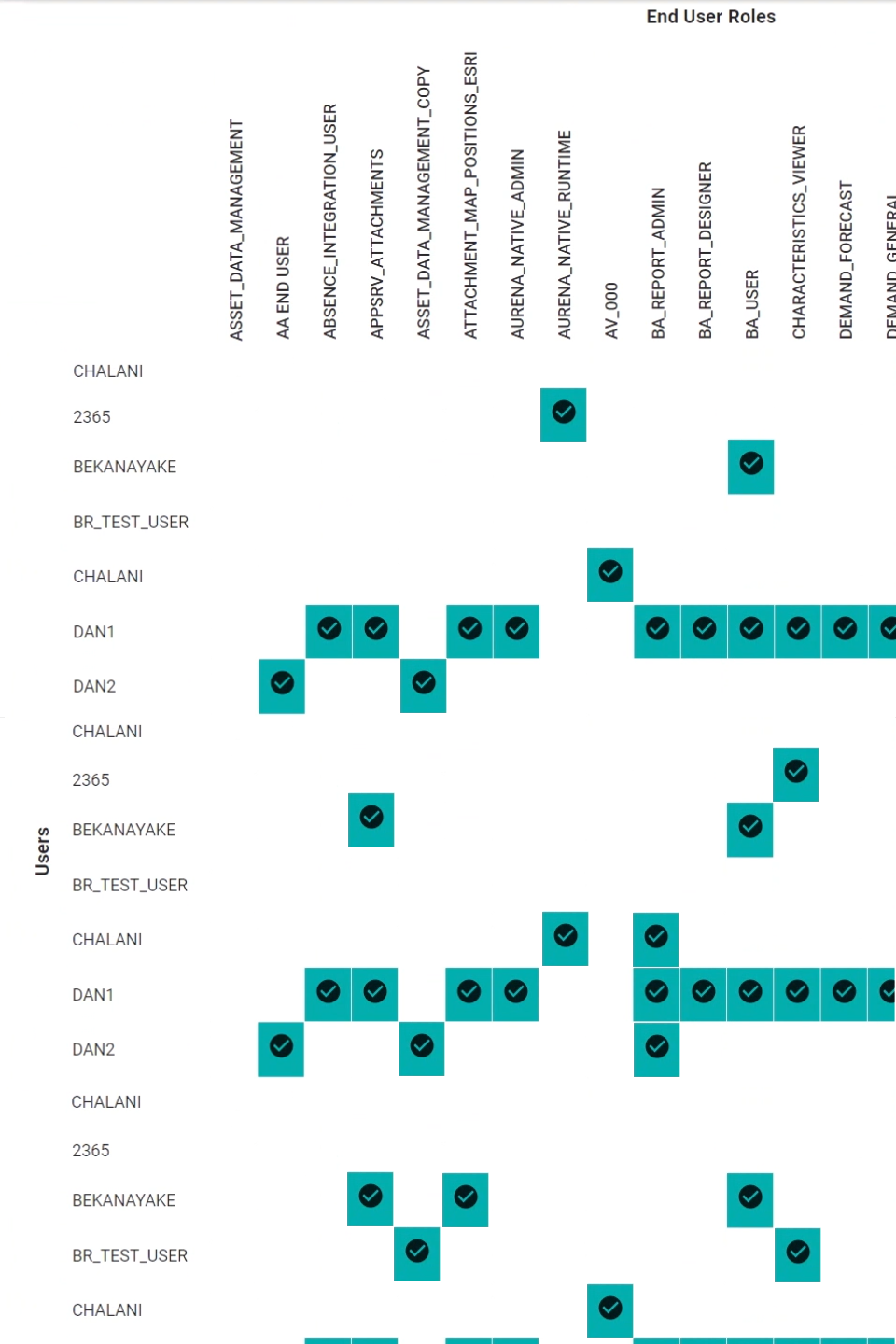
Users to End User Roles: Seamless User Management
A graphical representation of End users and their roles is a valuable instrument to manage access rights. Compare End users and compare roles. Both are vital for a serious management of roles and permissions.
- Effortless User Assignment:
Easily assign End users to one or many roles with a click. It's user management simplified. - Active Mappings Made Simple:
Select and manage active mappings with ease. No more confusion or complexity.
Streamline your End user management with our IFS tool and make life easier for your team!
Reporting: Insights at Your Fingertips
- User Activity & List:
Gain valuable insights into user activity and access an up-to-date user list. Stay on top of whats going on in your IFS system. - Access History:
Track access history and monitor user interactions and system usage. Keep an eye on the past with ease. - History of Permission Changes:
Keep a detailed record of all permission changes. No more guesswork – it's all right there at your fingertips. - SoD Reports:
Ensure compliance with comprehensive Segregation of Duties (SoD) reports. We help you stay compliant when it comes to regulatory requirements.
Empower your organization with actionable insights and compliance solutions through our reporting feature. Your data, your way.
The IFS Permissions Manager is intuitive and makes sense.
One clear model from navigator entry to IFS user – so roles and permissions stay understandable, auditable and easy to change.
- 1
IFS Navigator
The navigator entries need grants (none, read only, read/write) to control their visibility and usage.
- 2
Functional Permission Sets
Individual navigator functions are grouped to permission sets to make their handling easier.
- 3
User Roles
The functional permission sets are grouped into end user roles.
- 4
IFS User
Individual IFS users are granted one or more roles. This makes user handling much clearer and controllable.
Connected to your IFS – in three steps
Connect your IFS environment
The IFS Permissions Manager connects to your IFS Apps 10 or Cloud environment after giving it the necessary authorizations.
Present IFS data
API technology is used to present your IFS data in the IFS Permissions Manager. The roles and permissions are presented in easy to read graphical overviews with clear symbols.
Control all from the IFS Permissions Manager
The IFS Permissions Manager replaces the tiresome roles and permissions interface of IFS. In the tool you have full control and traceability with pre-defined reports which can be adapted.
Receive the entire system as standard
No restrictions, hidden costs or bolt-ons.
- Receive the entire system as standard, no restrictions, hidden costs or bolt-ons.
- Technical support via phone, chat and email with our friendly team.
- Receive a tool that is connected to your IFS environment without its own data.
- Hosting and maintenance is included in the price.
- Get the most modern and comprehensive tool to manage your IFS roles and permissions.
- Stay compliant towards internal and external auditors and have all reports up-to-date and at your fingertips.
A simple and transparent pricing plan
One easy subscription based on the number of IFS full users – hosting, maintenance and support included. Add the conversion service if you migrate from Apps 10 to IFS Cloud.
One-time set-up –: one day of online business consulting (best practice in roles and permissions) and half a day of technical consulting (connecting the APIs). USD is indicative at 1 CHF ≈ 1.25 USD; invoices are issued in CHF.
Fit to purpose
Subscribe to the IFS Permissions Manager to manage your permissions. If needed, buy the conversion service for your migration from Apps 10 to Cloud.
Technical support
Technical support via phone, chat and e-mail with our friendly team.
Directly connected
Receive a tool that is connected to your IFS environment without its own data. Hosting and maintenance are included in the price.
Reports
Stay compliant towards internal and external auditors and have all reports up to date and at your fingertips.
Our partners trust the IFS Permissions Manager
To guarantee easy and safe handling of their roles and permissions.








Frequently asked questions
Can we request a demonstration of your software?
Absolutely, we offer remote demos of the IFS Permissions Manager. To request a demo, call us or make an appointment.
Do you offer professional services?
A vital part of our company is the level of expertise that you receive when using our IFS Permissions Manager. Our initial set-up packages include one day of business consulting and training on roles & permissions. If further support is needed, then Purple Services can offer you the best and most experienced IFS Roles & Permissions consultants available in the market. The consulting can be carried out on-site or remote.
Do you offer long term contracts?
We offer yearly subscription contracts with an automatic extension. If you need an alternative model, then just get in touch to discuss your requirements and we will configure an appropriate model.
Interested? Book a free demo of the IFS Permissions Manager.
Contact us
Use the contact form if you have questions about our products. Our sales team will be happy to help you – we get back to you within 1–2 working days.
Offices
Switzerland
Purple Services GmbH
Untere Rebrainstrasse 7
9213 Hauptwil
Purple Services GmbH
c/o 2BCS AG
Unterrietstrasse 2a
8152 Glattbrugg / Zurich
Sri Lanka
Trivo Consulting (Pvt) Ltd.
Mahaiyawatta Road 469/8/J
Colombo
